
Smarter Access. Safer Data. Better School Control.
In every school, not everyone needs access to everything. Teachers, office staff, accountants, and administrators all have different responsibilities. When access is not clearly defined, it leads to confusion, mistakes, and security risks. ERP SchoolAura Role Management feature helps schools assign the right access to the right people, without complexity. It brings clarity, control, and confidence to daily school operations, even for the smallest schools.
What is Role Management in School Software?
Role management software is a system that helps schools decide who can access which parts of the system and what data they can see. Instead of giving full access to everyone, schools can create roles like Admin, Teacher, Accountant, Librarian, or School Staff and give each role only the access they need.
ERP SchoolAura Role Management helps schools control access to academics, student records, finance, attendance, exams, and other areas from one place. This keeps data safe, work organized, and responsibilities clear for every department.
Why Role Management is Important for Schools
Schools work with important information every day. This includes student details, staff records, finances, and academic reports. If access is not controlled properly, data can be misused or altered by mistake.
Role management helps schools:
- Protect confidential information
- Reduce operational errors
- Improve staff accountability
- Maintain structured workflows
- Comply with data security practices
ERP SchoolAura makes role management simple, visual, and easy to control from one central dashboard.
Key Features of ERP SchoolAura Role Management
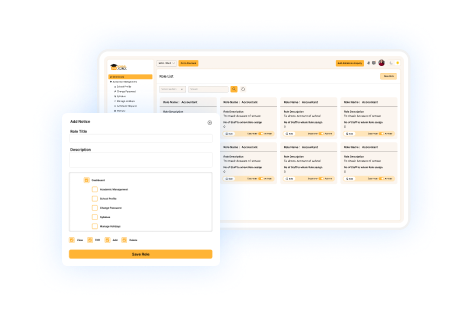
Role List Dashboard
See all roles and access rights at a glance
- Displays a clear list of all roles created in the system
- Shows which departments and modules each role can access
- Covers major areas like academic management, student management, finance, attendance, and administration
- Makes it easy for school admins to review and audit permissions
Everything stays organized, visible, and under control from a single screen.
Create New Roles Easily
Add roles that match your school structure
- Create a new role by adding a role title and short description
- Define the department the role belongs to
- Suitable for roles like Admission Staff, Exam Coordinator, or Accounts Clerk or any other school staff
- Flexible enough for small schools and growing institutions
You can design roles based on how your school actually works
Module-Based Access Control
Grant access only where it is needed
- Assign access to specific modules by simply ticking checkboxes
- Control access for academic, student, staff, finance, transport, and other modules
- Prevent unnecessary access to sensitive data
- Reduce errors caused by accidental changes
Each role gets exactly the access it needs, nothing more and nothing less.
Department-Wise Permission Management
Keep responsibilities clear across Departments
- Assign roles based on departments such as academics, administration, or accounts
- Ensure staff focus only on their assigned work areas
- Avoid overlap and confusion between departments
- Improve coordination without micromanagement
Clear permissions lead to smoother daily operations.
Secure and Controlled Access
Protect school data with structured permissions
- Restrict critical actions to authorized roles only
- Prevent unauthorized data edits or deletions
- Maintain data integrity across all modules
- Support secure school management practices
Security becomes part of the system, not an afterthought.
Easy Updates as School Grows
Modify roles anytime without disruption
- Edit roles when responsibilities change
- Add or remove module access in seconds
- Create new roles as new staff join
- Scale easily as the school expands
Your system grows with your institution, without rework or confusion.
Offline Role Control vs Online Role Management
Why Digital Access Control Wins Every Time
| Aspect | Offline Role Control | ERP SchoolAura Online Role Management |
|---|---|---|
| Access Control | Verbal or manual instructions | Clearly defined digital permissions |
| Error Risk | High chance of mistakes | Minimal errors with role-based access |
| Data Security | Weak and untracked | Strong, controlled, and auditable |
| Scalability | Difficult to manage as school grows | Easy to scale and modify |
| Transparency | No visibility | Full role and permission visibility |
| Efficiency | Time-consuming | Fast and centralized |
Online role management brings structure, safety, and speed to school administration.
Why Choose ERP SchoolAura for Role Management?
Designed for schools of all sizes
Whether you run a small primary school or a large institution, ERP SchoolAura adapts easily.
Simple and easy to use
No technical knowledge needed. Designed for easy role management by anyone.
Better data security
Sensitive information stays protected with controlled access.
Improved staff accountability
Clear roles ensure everyone knows their responsibilities.
Fully integrated system
Role management works seamlessly with all ERP SchoolAura modules.
Future-ready flexibility
Easily adjust permissions as school policies and teams evolve.
Transform Your School with Smarter Role Management
Clear access control is the foundation of a secure and well-managed school. With ERP SchoolAura Role Management Software, schools gain confidence, clarity, and control over daily operations. From protecting sensitive data to improving staff efficiency, role management ensures everything runs exactly as planned. Step into a smarter way of managing your school with structured access and complete peace of mind.
FAQs
Yes. ERP SchoolAura allows you to create fully custom roles based on your school’s needs.
Absolutely. Even small schools benefit from clear access control and data protection.
Yes. Roles and permissions can be updated anytime without affecting existing data.
No. It works smoothly in the background without slowing down the system.
No training is required. The interface is simple and user-friendly, allowing anyone to manage roles easily without technical knowledge.